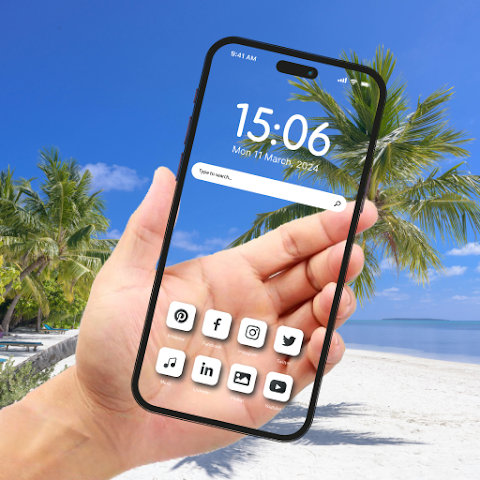

Ever looked at someone’s Android phone and wondered how their home screen looks so clean — almost like there’s no wallpaper at all? That’s the magic of transparent wallpapers.
In 2026, this minimalist trend is more popular than ever. Whether you want a clean workspace feel or just love a simple aesthetic, setting a transparent wallpaper on Android is easier than most people think.
In this guide, you’ll learn exactly what transparent wallpapers are, how to set them up, the best tools to use, and pro tips to make your home screen look stunning.
What Is a Transparent Wallpaper for Android?
A transparent wallpaper is basically a solid black or near-invisible image that, when set on your Android home screen, makes the background appear completely empty or see-through.
On Android devices, a pure black wallpaper (especially on AMOLED screens) turns off those pixels completely — giving the illusion of total transparency. The result? Your app icons appear to float on a dark void, creating a sleek, modern look.
It’s not a technical trick or a system hack. It’s simply a smart use of how Android and AMOLED displays work together.
Key Features and Benefits of Transparent Wallpapers
Here’s why millions of Android users love this style:
- Ultra-clean home screen — No busy backgrounds to distract from your apps or widgets
- Battery saving (on AMOLED screens) — Pure black pixels are turned off, saving real battery life
- Works with any icon pack — Your icons look bolder and more visible
- Easy to set up — No technical skills needed
- Great for productivity — Less visual clutter means better focus
- Highly customizable — Combine with minimal icon packs, widgets, and launchers for a unique look
Best Tools and Methods to Set a Transparent Wallpaper in 2026
There are several simple, safe ways to get this look on your Android phone.
1. Use a Pure Black Image
The simplest method. Find or create a completely black image (1080 x 1920 pixels or matching your screen resolution) and set it as your wallpaper. On AMOLED phones like Samsung Galaxy or Google Pixel, black pixels turn off entirely — making the screen look truly transparent.
How to do it:
- Open your Gallery or Photos app
- Select the black image
- Tap “Set as wallpaper” and choose Home Screen
2. Use a Wallpaper App
Several free apps on the Google Play Store offer transparent and minimal wallpaper options. Look for apps labeled as “minimal wallpaper,” “AMOLED black wallpaper,” or “void wallpaper.” These apps let you pick the exact shade of black or transparency level you want.
What to look for in a good app:
- High-resolution output
- No watermarks
- Simple user interface
- Free to use
3. Create Your Own Using a Photo Editor
Apps like Canva, Adobe Express, or Snapseed let you create a custom transparent-style wallpaper in minutes. Just create a solid black canvas at your phone’s screen resolution and save it to your gallery.
This method gives you full control — add a subtle gradient, text, or leave it completely empty.
4. Use Your Launcher Settings
If you use a third-party launcher like Nova Launcher, Lawnchair, or Niagara Launcher, many of them have built-in options to reduce or remove the wallpaper visual entirely, giving you similar results without needing a separate image.
Comparison: Transparent Wallpaper vs. Regular Wallpaper
| Feature | Transparent / Black Wallpaper | Regular Photo Wallpaper |
|---|---|---|
| Battery Usage | Lower (AMOLED) | Higher |
| Visual Clutter | Minimal | Can be busy |
| Icon Visibility | High | Depends on image |
| Customization | Flexible | Limited to photo |
| Setup Difficulty | Very Easy | Easy |
| Best For | Minimal aesthetic lovers | Visual/creative users |
Pros and Cons
✅ Pros
- Saves battery on AMOLED displays
- Clean, distraction-free look
- Works on almost every Android device
- Free and easy to achieve
- Makes widgets and icons stand out more
❌ Cons
- May look too plain for users who prefer colorful aesthetics
- On LCD screens, pure black looks dark gray — not truly “off”
- Requires pairing with good icon packs to look its best
- Some launchers may add a slight background blur that affects the effect
Practical Tips and Best Practices
Getting the transparent wallpaper look right takes a little more than just a black image. Here are some expert tips:
1. Pair it with a minimal icon pack The cleaner your icons, the better the transparent effect looks. Try icon packs with simple shapes and minimal colors.
2. Remove icon labels In your launcher settings, turn off icon text labels. This makes the home screen look even more minimal and elegant.
3. Use dark-themed widgets Clocks, weather widgets, and calendar widgets often have dark or transparent options. Mix these in to keep the aesthetic consistent.
4. Try a grid-free layout Place your icons freely instead of in a rigid grid. This looks more creative and personal.
5. Match your notification bar Use a dark system theme so your status bar icons and notification bar also blend into the transparent look.
6. Experiment on lock screen too Set the same black wallpaper on your lock screen for a full, immersive minimal experience.
Frequently Asked Questions (FAQs)
Q1: Does transparent wallpaper actually save battery on Android?
Yes, but only on phones with AMOLED or OLED displays. On these screens, pure black pixels are literally switched off, which uses no power. On LCD screens, this effect doesn’t apply since the backlight stays on regardless of color.
Q2: Can I set a transparent wallpaper on any Android phone?
Absolutely. Any Android phone can use a black or minimal image as wallpaper. However, the true “pixel-off” transparency effect only works visually on AMOLED/OLED display phones.
Q3: Do I need a special app to get this effect?
Not at all. You can simply save a black image to your phone and set it as wallpaper through your gallery. Apps just make the process quicker and offer more design options.
Q4: Will this make my phone look boring?
Not if done right! Pair the transparent wallpaper with a great icon pack, clean widgets, and a custom font in your launcher. Many people find this style more elegant and sophisticated than photo-based wallpapers.
Q5: Which Android launchers work best with transparent wallpapers?
Nova Launcher, Niagara Launcher, and Lawnchair are among the most popular choices. They offer fine-tuned customization options that complement the transparent aesthetic beautifully.
Conclusion
Setting a transparent wallpaper on your Android phone in 2026 is one of the simplest ways to give your device a fresh, modern, and distraction-free look. Whether you choose a plain black image, a minimal wallpaper app, or design your own — the results can be genuinely impressive.
Best of all, it costs nothing, requires no technical skills, and works on virtually every Android device.
Ready to transform your home screen? Explore minimal wallpaper tools and icon packs to complete your setup and create a look that’s truly yours.