
Getting a passport photo used to mean booking a studio, paying extra fees, and waiting in line. Not anymore.
Today, you can create a perfect passport size photo from your smartphone or computer in just one click — for free. Whether you need it for a visa, ID card, or official document, these tools make the process incredibly simple.
In this guide, you’ll discover the best free passport photo maker tools, how to use them, and expert tips to get a professional result every time.
What Is a One Click Passport Size Photo Maker?
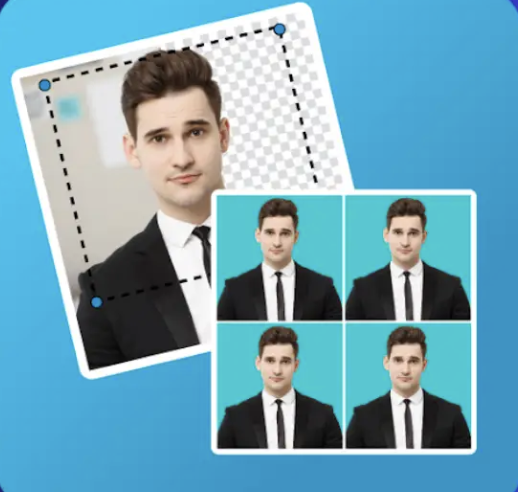
A one-click passport size photo maker is an online tool or app that automatically resizes, crops, and formats your photo to meet official passport or ID photo standards.
You simply upload a selfie or portrait photo, and the tool does the rest — removing the background, adjusting the size, and preparing the image for printing or digital submission.
These tools are designed for anyone who wants a quick, professional-quality ID photo without visiting a photographer.
Why Use a Free Online Passport Photo Tool?
There are plenty of good reasons why millions of people use these tools every year:
- Saves money — No need to pay for a studio session
- Saves time — Get your photo ready in under a minute
- Works anywhere — Use it from home, office, or while traveling
- Meets official standards — Most tools follow ICAO and country-specific photo guidelines
- Easy to use — No design or editing skills needed
Even if you’ve never edited a photo before, these tools are built to be beginner-friendly.
Best Free One Click Passport Size Photo Maker Tools (2026)
Here are the most reliable and widely used tools available right now:
1. Passport Photo Online
One of the most popular tools globally, Passport Photo Online uses AI to automatically detect your face, remove the background, and resize your photo to the correct dimensions.
It supports passport photo sizes for over 100 countries, making it a great choice for international users. The interface is clean and simple — upload, adjust, and you’re done.
Best for: Travelers and visa applicants needing country-specific formats
2. IDPhoto4You
IDPhoto4You is a completely free, browser-based tool that requires no account or registration. Just upload your photo, select your document type, and the tool automatically formats everything.
It supports a wide range of document types including passports, driving licenses, and visa applications.
Best for: Quick, no-signup solutions
3. Pixelied Passport Photo Maker
Pixelied offers a clean and modern interface with automatic background removal. You can fine-tune your photo before finalizing it, which gives you a bit more control compared to other tools.
It also lets you print multiple photos on a single sheet — very useful if you need several copies.
Best for: Users who want a polished, print-ready result
4. PhotoAiD
PhotoAiD uses artificial intelligence to check your photo against official guidelines in real time. It tells you if your lighting, background, or head position doesn’t meet the requirements — before you submit or print.
This makes it especially helpful if your photo will be used for an important document like a passport or visa.
Best for: Accuracy and official compliance
5. Canva (Passport Photo Template)
While Canva is mainly a design tool, it includes passport photo templates that you can customize easily. It gives you more creative control than automated tools, though you’ll need to manually adjust sizing in some cases.
Best for: Users comfortable with basic design and needing custom formatting
Quick Comparison Table
| Tool | Free to Use | Auto Background Removal | Country Support | No Signup Needed |
|---|---|---|---|---|
| Passport Photo Online | ✅ | ✅ | 100+ countries | ❌ |
| IDPhoto4You | ✅ | ✅ | Wide range | ✅ |
| Pixelied | ✅ | ✅ | Standard sizes | ✅ |
| PhotoAiD | ✅ (basic) | ✅ | 100+ countries | ❌ |
| Canva | ✅ | Manual | Standard | ❌ |
Pros and Cons of Using Online Passport Photo Makers
✅ Pros
- Completely free or very low cost
- Fast results — usually under 60 seconds
- AI-powered tools remove backgrounds automatically
- Works on mobile and desktop
- No professional equipment needed
❌ Cons
- Photo quality depends on your original image (good lighting matters)
- Some tools require sign-up for full features
- Free versions may have limited download options
- Not all tools guarantee 100% acceptance by government agencies
Practical Tips for a Perfect Passport Photo
Getting a great result depends not just on the tool, but also on how you take your photo. Here are some proven tips:
1. Use good lighting Natural light from a window works best. Avoid harsh shadows on your face or behind you.
2. Use a plain background Stand in front of a plain white or light-colored wall. Most tools can remove it, but a clean background gives better results.
3. Look straight at the camera Keep your head level and look directly into the lens. Avoid tilting your head.
4. Use a neutral expression Most passport photo standards require a neutral expression with your mouth closed.
5. Wear appropriate clothing Avoid white shirts (they may blend with the background) and avoid heavy accessories or hats.
6. Use a recent photo Officials typically require a photo taken within the last 6 months.
7. Check the size requirements Different countries have different passport photo dimensions. Always confirm the required size before uploading.
FAQs
Q1: Are free passport photo maker tools safe to use? Yes, most reputable tools are safe. However, avoid uploading photos to unknown or untrustworthy websites. Stick to well-reviewed tools like the ones listed in this guide.
Q2: Will these photos be accepted by government offices? Most AI-based tools follow international ICAO photo standards, which are widely accepted. However, acceptance can vary by country and document type. It’s always a good idea to double-check your country’s official photo requirements before submitting.
Q3: Can I use my smartphone to take a passport photo? Absolutely. Modern smartphones take high-resolution photos that work perfectly with these tools. Just make sure your lighting is good and your background is clean.
Q4: How do I print my passport photo after creating it? After creating your photo, you can save it and print it at any local print shop or home printer. Many tools also offer a printable sheet with multiple copies of your photo.
Q5: What size is a standard passport photo? The most common size is 2×2 inches (51×51 mm), which is used in the US and many other countries. However, sizes vary — for example, the UK uses 35×45 mm. Always verify the required dimensions for your specific document.
Conclusion
Creating a passport-size photo no longer requires a professional studio or expensive equipment. With the right free online tool, you can get a high-quality, officially compliant photo from the comfort of your home — in just one click.
The tools listed in this guide are trusted, widely used, and easy to get started with. Whether you’re applying for a passport, visa, or ID card, they’ll save you time and money.
Explore these tools today and get your perfect passport photo ready in minutes.
Have questions or want to share your experience with a passport photo tool? Feel free to leave a comment below!