
Your phone holds your photos, messages, bank apps, and personal memories. Leaving it unprotected is like leaving your front door wide open.
A strong pattern lock is one of the simplest and most effective ways to secure your device. But not everyone knows how to create a truly secure pattern — and that’s exactly where online pattern lock generators come in.
In this guide, you’ll learn what a mobile pattern lock generator is, how it works, which tools are worth using, and how to create a pattern that’s hard to guess but easy for you to remember.
What is a Mobile Pattern Lock Generator?
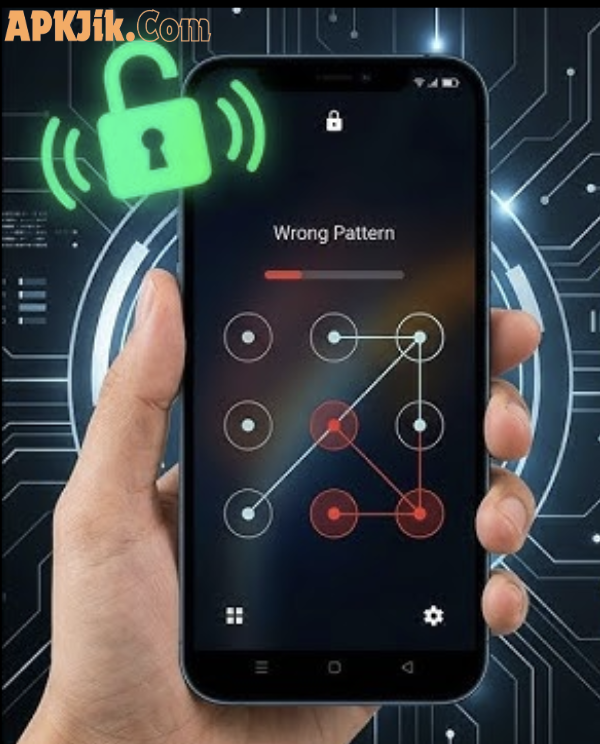
A mobile pattern lock generator is an online tool that helps you design and visualize a custom unlock pattern for your smartphone or tablet.
Instead of picking a simple zigzag or “Z” shape (which are the most commonly guessed patterns), these tools help you explore more complex, creative designs that offer stronger security.
Most generators work on a 3×3 or 4×4 dot grid — the same grid used on Android phones. You connect the dots in a sequence, and the tool shows you the pattern visually before you set it on your device.
Think of it like a “password generator” — but for patterns instead of text.
Best Pattern Lock Generator Tool (Free Android Pattern Creator)
Use this free Pattern Lock Generator tool to create strong and secure Android patterns. This tool helps you generate unique lock patterns for better mobile security.
Pattern Lock Generator Tool
Create secure Android pattern locks instantly for your device
Key Features and Benefits
Here's why using an online pattern lock generator is a smart idea:
- Visual preview — See exactly what your pattern looks like before applying it to your phone.
- Security scoring — Some tools rate how strong your pattern is (weak, medium, strong).
- Multiple grid sizes — Choose between 3×3, 4×4, or even 5×5 grids for more complexity.
- Easy to use — No technical skills needed. Just click, drag, and design.
- Works on any device — Access from your browser on a phone, tablet, or computer.
- Free to use — Most reputable tools are completely free with no sign-up required.
- Privacy-safe — Good generators don't store your pattern data on their servers.
These features make pattern generators useful for everyday users who want better phone security without complicated settings.
Best Online Tools to Create Pattern Locks in 2026
Here are some of the safest and most helpful types of tools available online:
1. Browser-Based Pattern Visualizers
These are simple websites where you draw your pattern on a virtual grid. They show the path clearly and sometimes give a security strength rating. Great for beginners.
2. Security-Focused Pattern Generators
Some cybersecurity websites offer pattern lock tools alongside tips on digital security. These tools often include advice on what makes a pattern weak or strong.
3. Mobile UI Design Tools
Designers and developers sometimes use tools like Figma or similar platforms to visualize lock screen patterns for app development or presentations. These are more advanced but freely accessible.
4. Educational Security Platforms
Websites focused on digital literacy and cybersecurity education often include interactive pattern lock demos. These are especially useful for teaching children or elderly users about phone security.
Tip: Always use a tool that works directly in your browser without asking you to install anything or create an account.
Comparison: Pattern Lock vs Other Screen Lock Methods
| Lock Type | Security Level | Ease of Use | Best For |
|---|---|---|---|
| Pattern Lock | Medium–High | Very Easy | Everyday users |
| PIN (4–6 digits) | Medium | Easy | Quick access users |
| Password | High | Moderate | Privacy-focused users |
| Fingerprint | Very High | Very Easy | Modern smartphones |
| Face Recognition | High | Very Easy | Convenience seekers |
A pattern lock sits in a sweet spot — easy to use quickly but much stronger than leaving your phone unlocked. When combined with fingerprint or face lock as a backup, it becomes even more secure.
Pros and Cons of Using a Pattern Lock
✅ Pros
- Fast and intuitive to unlock
- Easy to remember compared to long passwords
- Customizable with many possible combinations
- Supported on almost all Android devices
- No need to remember letters or numbers
❌ Cons
- Smudge marks on the screen can reveal your pattern
- Simple patterns (like "L" or "Z") are easy to guess
- Less secure than a strong alphanumeric password
- Not available as a primary lock on iOS devices
- Someone watching you unlock can memorize the pattern
Practical Tips for Creating a Secure Pattern Lock
Follow these tips to make your pattern as secure as possible:
1. Avoid starting from a corner dot. Most people start from the top-left corner. Starting from the center or an edge dot makes your pattern less predictable.
2. Use more than 6 dots. Patterns using only 4–5 dots have far fewer combinations. Aim for 7–9 dots for much stronger security.
3. Cross over dots and change directions. Straight lines and simple shapes are easy to guess. A pattern that zigzags, doubles back, or crosses itself is much harder to replicate.
4. Clean your screen regularly. Fingerprint smudges can reveal your pattern. Wipe your screen often, especially if your phone contains sensitive information.
5. Enable the "hide pattern" option. Most Android phones let you turn off the visual line while drawing. This prevents people nearby from watching and memorizing your pattern.
6. Change your pattern every few months. Just like a password, refreshing your pattern occasionally is a good security habit.
7. Don't share your pattern casually. Even with people you trust, keeping your unlock pattern private is the safest approach.
FAQs
Q1: Are online pattern lock generators safe to use? Yes, reputable browser-based tools are safe. They simply display a visual grid and don't access your actual device. Make sure you use tools that don't ask for personal information or device permissions.
Q2: Can I use a pattern lock on an iPhone? Pattern locks are primarily an Android feature. iPhones use PIN, password, Face ID, or Touch ID. However, some third-party security apps on iOS offer pattern-style locks for specific app vaults.
Q3: How many possible combinations does a 3×3 pattern lock have? A standard 3×3 grid has around 389,112 possible patterns when all rules are applied correctly. However, research shows most users pick from fewer than 20 common patterns — so creativity really matters.
Q4: What is the strongest type of pattern lock? Patterns that use 8–9 dots, start from a non-corner position, include direction changes, and cross over previously visited dots are considered the strongest.
Q5: Is a pattern lock better than a PIN? Both have similar security levels when used correctly. A long, complex pattern can be harder to guess than a short PIN. However, a 6-digit PIN or alphanumeric password generally offers stronger mathematical security. Using both together (where supported) gives the best protection.
Conclusion
A strong pattern lock is one of the easiest upgrades you can make to your phone's security today. With the help of an online pattern lock generator, you can visualize, test, and perfect your unlock pattern before applying it to your device.
The key takeaway is simple: avoid obvious patterns, use more dots, and change your pattern regularly. Small habits like these go a long way in protecting your personal data.
Ready to level up your phone security? Explore available pattern lock tools online and design a pattern that's truly yours — and truly secure.