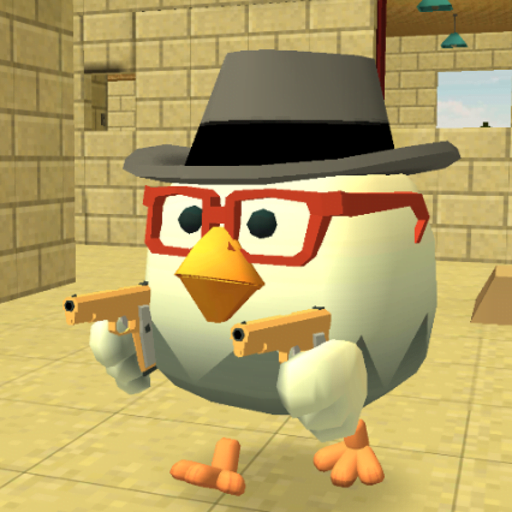

If you’ve ever wanted to play a multiplayer shooting game where chickens run wild with weapons — you’re in the right place. Chicken Gun is one of the most entertaining and addictive mobile games available right now, and its popularity keeps growing every year.
In this guide, you’ll learn what makes Chicken Gun so fun, what features it offers, tips to play better, and how to enjoy the full experience without any risk or hassle.
What Is Chicken Gun?
Chicken Gun is a humorous online multiplayer shooting game where players control armed chickens battling each other across different maps. Developed by ChaloApps, it blends casual gameplay with exciting action — making it perfect for all ages.
The game features colorful graphics, funny character designs, and fast-paced battles that keep players coming back for more. It’s free to play and available on both Android and iOS platforms worldwide.
Key Features of Chicken Gun in 2026
Here’s what makes Chicken Gun stand out from other mobile shooters:
- Unique Characters — Play as customized chickens with different outfits, skins, and accessories that make your bird look truly one-of-a-kind.
- Massive Weapon Collection — From basic pistols to rocket launchers, the game offers a huge variety of weapons to choose from.
- Multiplayer Battles — Jump into real-time PvP matches against players from around the world, anytime and anywhere.
- Custom Maps — Multiple battle arenas keep the gameplay fresh and exciting every time you play.
- Regular Updates — The developers frequently add new content, weapons, and seasonal events to keep the game alive and interesting.
- Offline Play Option — Don’t have internet? You can still enjoy certain game modes without a connection.
- In-Game Customization — Personalize your chicken with hundreds of combinations of gear, weapons, and looks.
How to Play Chicken Gun: Beginner Tips
Starting out in Chicken Gun can feel overwhelming. Here are some practical tips to help you get ahead:
1. Master the Controls First Before jumping into multiplayer, spend time in solo mode to understand movement, shooting, and jumping mechanics.
2. Choose the Right Weapon Each weapon works better in different situations. Shotguns are great in close combat, while rifles work well at long range.
3. Upgrade Your Gear Regularly As you play and earn in-game coins, invest them in upgrading your weapons and armor to stay competitive.
4. Use the Environment Hide behind walls, use elevated positions, and use map layouts to your advantage. Good positioning wins more battles than just fast shooting.
5. Join a Clan or Team Playing with friends or joining a community group makes the game much more fun and helps you learn faster.
Chicken Gun vs. Other Mobile Shooters: A Quick Comparison
| Feature | Chicken Gun | Standard Mobile Shooters |
|---|---|---|
| Humor & Fun | Very High | Low to Medium |
| Graphics Style | Cartoonish & Colorful | Realistic |
| Game Size | Lightweight | Heavy |
| Casual Friendly | Yes | Sometimes |
| Family Friendly | Yes | Not Always |
Chicken Gun wins when it comes to casual, fun gameplay. It’s not trying to be the most realistic game — and that’s exactly what makes it so refreshing.
Pros and Cons of Chicken Gun
Pros
- Free to play with no mandatory purchases
- Very funny and entertaining for all ages
- Regular content updates from developers
- Works well on low-end devices
- Large global player community
Cons
- Some premium items require in-app purchases
- Occasional ads during gameplay
- Matchmaking can be unbalanced at times
- Limited competitive depth for hardcore gamers
Practical Tips to Get the Most Out of Chicken Gun
Watch and Learn — Spend time watching top players on YouTube or game communities. You’ll pick up strategies and tricks quickly.
Daily Missions Matter — Always complete your daily missions. They give you free coins and rewards that add up over time.
Don’t Skip Events — Seasonal events offer exclusive items and skins that are not available at other times. Participate whenever you can.
Manage Your Resources — Don’t spend all your coins at once. Save up for better weapons and gear rather than buying everything immediately.
Keep the Game Updated — Always use the latest version for the best performance, new features, and bug fixes.
Frequently Asked Questions (FAQs)
Q1: Is Chicken Gun free to play? Yes, Chicken Gun is completely free to download and play. Some cosmetic items and upgrades are available through optional in-app purchases, but the core game is fully accessible without spending money.
Q2: Can I play Chicken Gun without an internet connection? Yes, Chicken Gun offers offline gameplay modes. However, multiplayer battles and some features do require an active internet connection.
Q3: Is Chicken Gun safe for kids? Absolutely. The game has a cartoonish style with no graphic violence, making it suitable for children and families. The humor and design are kid-friendly.
Q4: How can I unlock more characters and weapons in Chicken Gun? You can unlock characters and weapons by earning in-game coins through gameplay, completing missions, participating in events, or optionally through in-app purchases.
Q5: Does Chicken Gun work on older smartphones? Yes, Chicken Gun is designed to run smoothly even on older or low-end devices, which is one of the reasons it’s popular worldwide.
Conclusion
Chicken Gun is a genuinely fun and lighthearted mobile game that offers hours of entertainment for casual and regular gamers alike. Its combination of humor, variety, and multiplayer action makes it one of the most enjoyable games in its category in 2026.
Whether you’re a new player just getting started or a seasoned veteran looking to sharpen your skills, there’s always something new to explore in the game.
Ready to dive deeper? Explore the official game community forums, watch tutorial videos, and connect with other players to level up your experience — and most importantly, have fun!